Use cases
Most useful flows are one of four shapes. Each shape below ships as a template (File → Start from template) and is published as a public
flow you can open, inspect and fork without an account.
Read this page to pick a starting point; read Core concepts for the mechanics behind it.
| Shape | Template | Public flow |
|---|---|---|
| One research pass → several deliverables | Industry intelligence | Open |
| Score something, then branch on the score | Lead qualification | Open |
| Upload a file → structured artifacts | Meeting → action plan | Open |
| Run on a timer and report, including “nothing” | Weekly monitor | Open |
Fan-out — research once, produce several formats
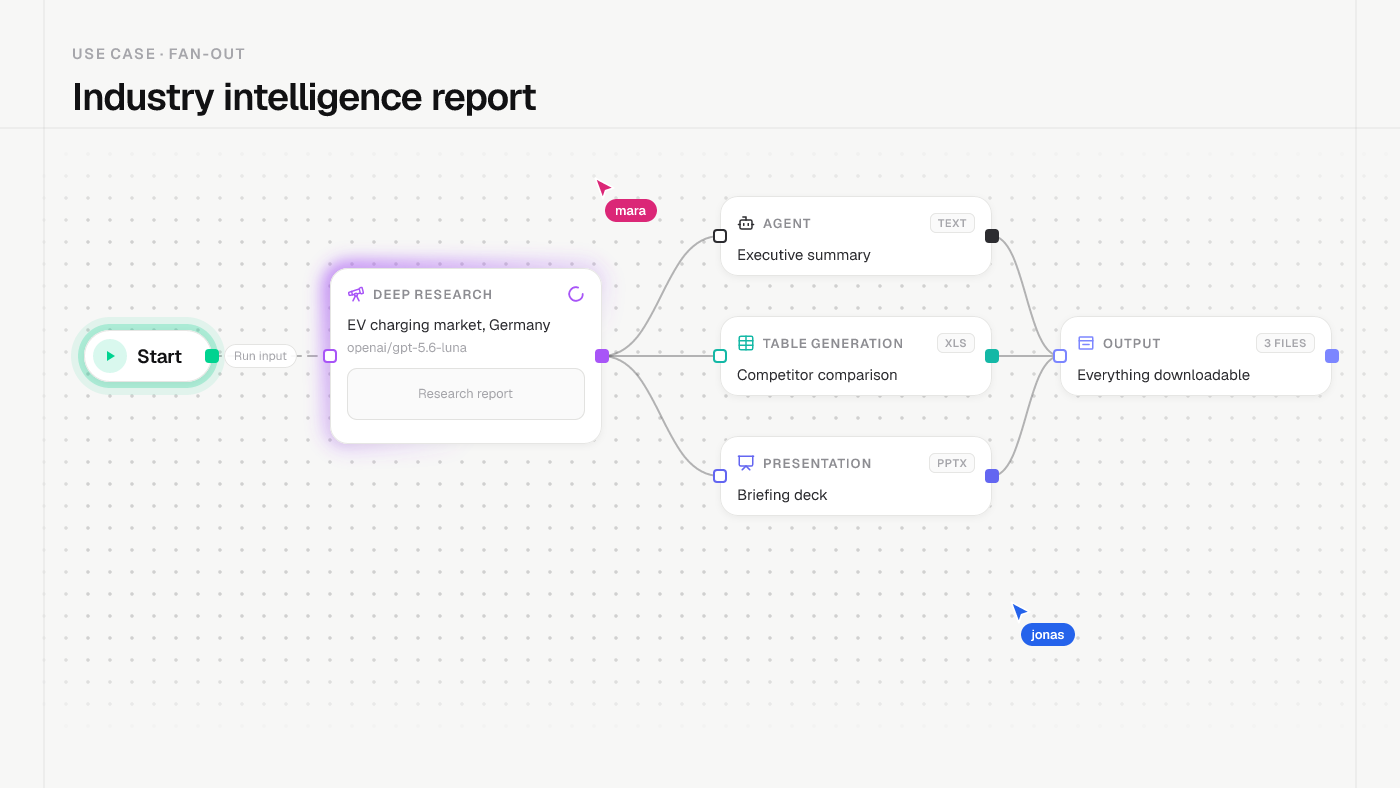
Template: Industry intelligence report · Flow: sobm.it/rTkQAN9yst
One Deep Research node runs several search rounds and a synthesis pass. Its single output feeds three consumers in parallel: an Agent for the executive summary, a Table Generation node for the competitor comparison, and a Presentation node for the deck.
Why fan out instead of chaining: the three deliverables read the same bytes, so they cannot contradict each other. Producing them in three separate runs lets the wording drift.
What to watch:
- Narrow the input question. A broad topic produces confident generality — the model is not the limiting factor, the question is.
- Spot-check citations in the report. The research node returns sources; a link that merely sits next to a claim is the failure mode to look for.
The same shape also fits: one transcript → summary + action items, one product spec → landing page + FAQ + changelog entry.
Routing — force a number, then branch on it
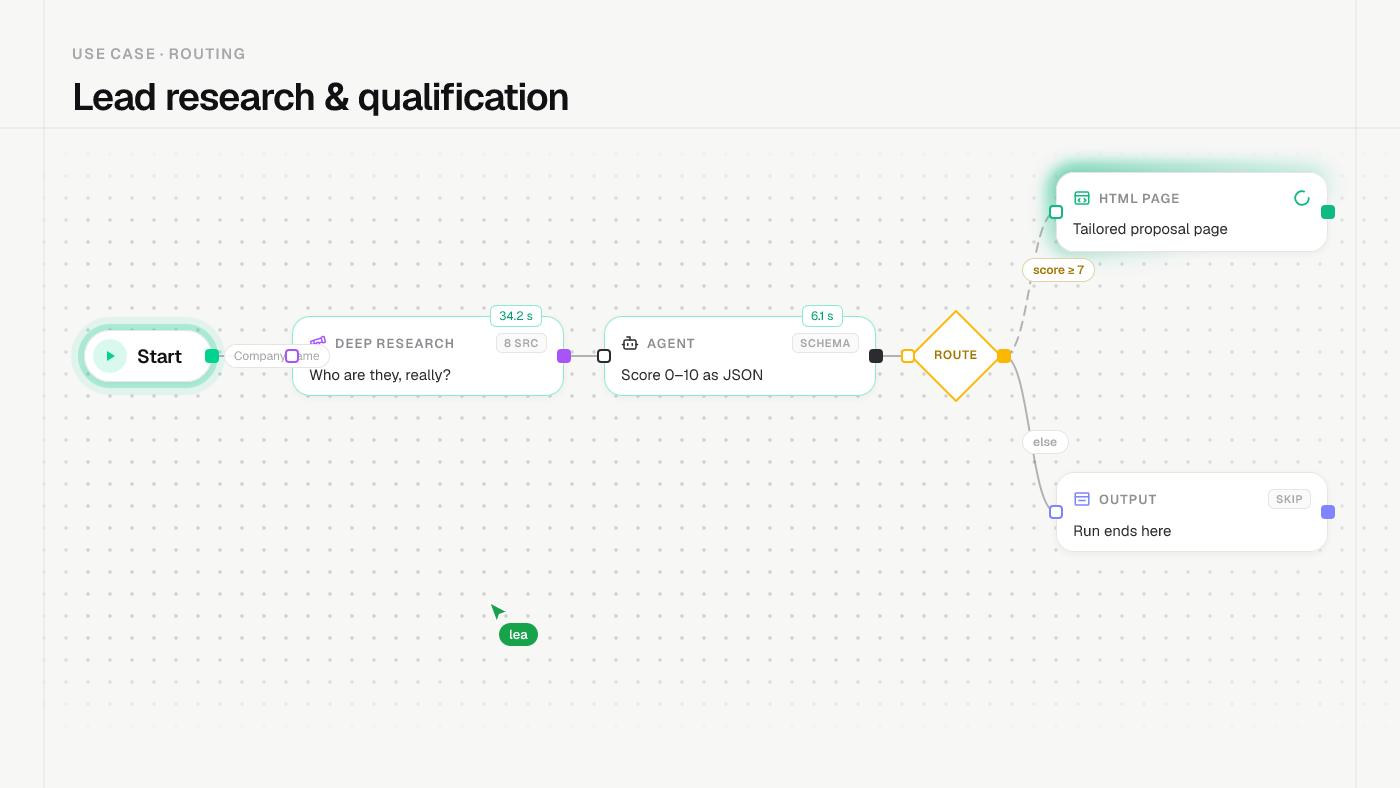
Template: Lead research & qualification · Flow: sobm.it/knGv1Jzrs5
Research a company, then let an Agent in json-schema mode return a fixed structure — company, score 0–10,
qualified, one sentence of reasoning, a few key facts. A Router branches on payload.score with gte 7:
qualified leads get a generated HTML Page proposal,
everything else ends at an Output.
Why the schema matters more than the model: a step allowed to answer in prose gives you “a strong candidate, though with some reservations” — which you then have to read and convert into a decision yourself. Asked for a number, the model commits to a number, and the Router can act on it.
What to watch:
- A Router takes exactly one branch and never fans out. Always give it an unconditional default edge, or a non-matching payload fails the run.
- Treat the score as a sort order, not a verdict. Read the reasoning sentence before acting on the number.
The same shape also fits: support-ticket triage, content moderation, invoice approval thresholds.
Upload → artifacts — turn a file into structure
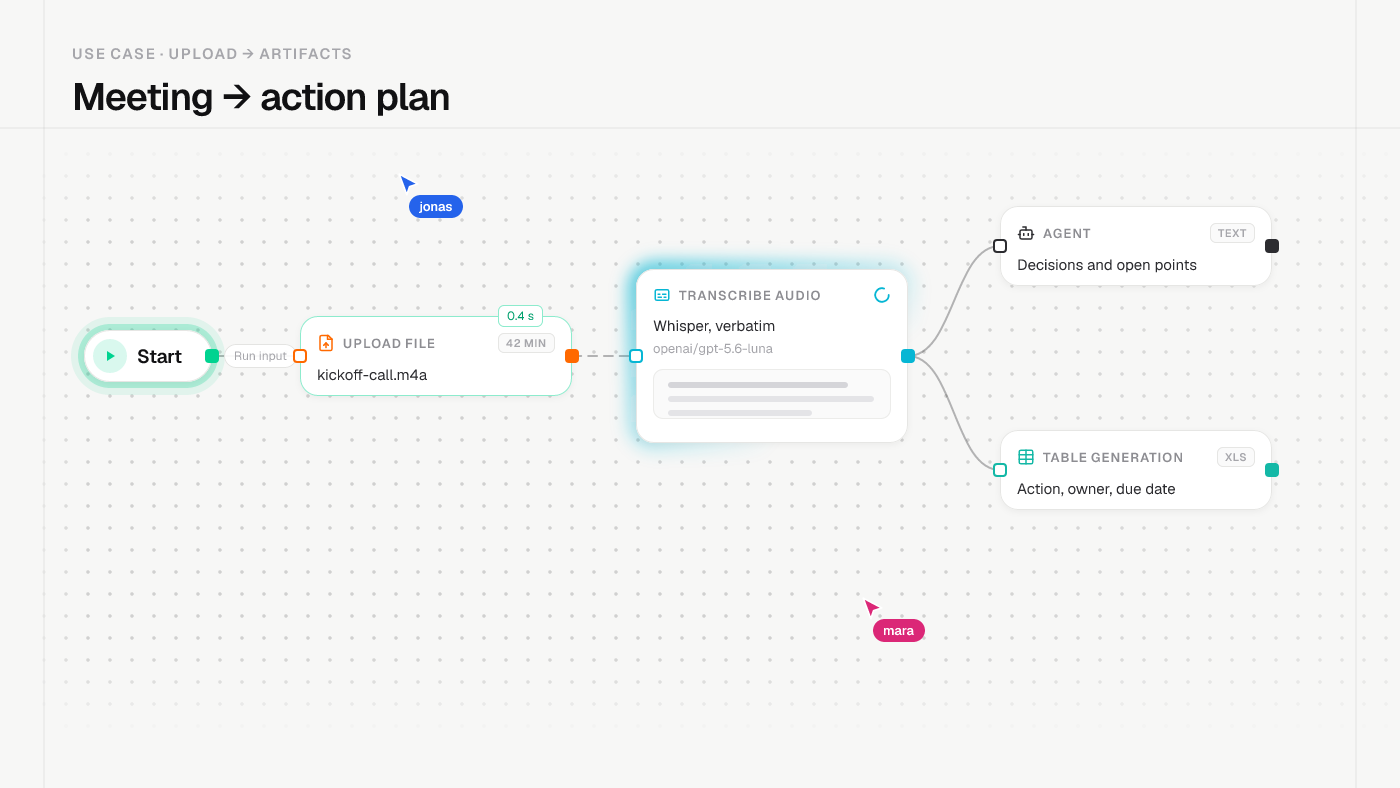
Template: Meeting → action plan · Flow: sobm.it/5Kj2JFaLoL
An Upload File node carries the recording into Transcribe Audio. The transcript then fans out into an Agent summary and a Table Generation node that extracts action items with owner, due date and priority.
The instruction that makes it useful: tell the table node to leave the owner cell empty when nobody was named, instead of inferring one. An empty cell is a visible, arguable gap; a guessed name is a silent error.
What to watch:
- Audio must reach
Transcribe Audiothrough itsaudiohandle. - A downloadable artifact (
.xls,.pptx,.html) is produced per run and kept in the node’s artifact history.
The same shape also fits: contract → obligations table, invoice PDF → line items, CSV export → cleaned sheet.
Schedule — run on a timer and report, including “nothing”
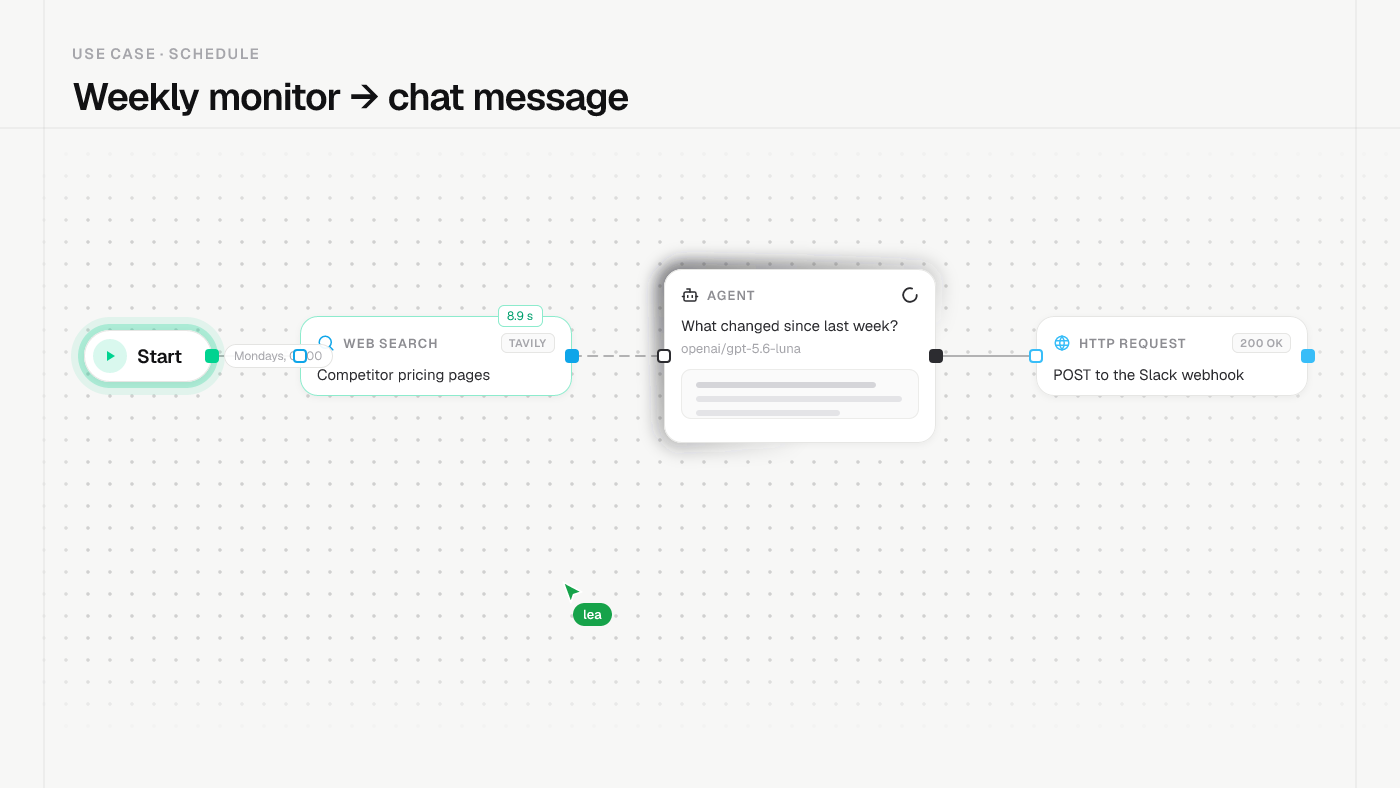
Template: Weekly monitor → chat message · Flow: sobm.it/8LenVNVyyZ
A Web Search node checks the sources, an Agent decides in JSON whether anything actually changed, and a Router picks the message. Both branches end in an HTTP Request to a chat webhook. Set the cadence under Schedule runs — see Schedules.
Why both branches post: a monitor that only speaks up when it finds
something is indistinguishable from one that has quietly stopped looking. If
a source disappears behind a login, the messages keep arriving on time — they
just stop containing it. This template therefore also asks the agent for a missing list of subjects it found no fresh data for.
What to watch:
- HTTP URLs are not
{…}-templated. Put dynamic values in the JSON body with{ "$from": "payload.headline" }. - Scheduled runs are billed to the flow owner and appear in the normal run history.
The same shape also fits: uptime digests, regulatory-change watch, weekly KPI summaries.
Two shapes that disappoint
Worth knowing before you build them:
- A daily digest of everything. It runs reliably and gets read twice. A digest has to answer a question you actually have, otherwise it is a well-formatted notification you learn to ignore.
- A drafting assistant for decisions you have not made. Generating an email is fast; deciding whether to send it and what position to take is the slow part, and no node does that for you.
The rule both point at: automation pays where you were mechanically moving data between steps. Where the slow part was judgement, it adds a review step instead of removing work.
Related
- Core concepts — nodes, edges, handles, the run lifecycle.
- Quick start — build the smallest possible flow first.
- Router — conditions, operators and the default edge.
- Schedules — cadence, timezone, fixed input.